> ## Documentation Index
> Fetch the complete documentation index at: https://docs.testdino.com/llms.txt
> Use this file to discover all available pages before exploring further.
# TestDino Project Settings
> Manage API keys, integrations, reports, AI features, and environment mapping.
Configure project identity, API keys, automated reports, AI features, integrations, and branch mapping.
| Setting | What it controls |
| :-------------------------------------- | :------------------------------------------- |
| [General](#general) | Name, description, delete project |
| [API Keys](#api-keys) | Credentials for streaming and CI |
| [Automated Reports](#automated-reports) | Scheduled PDF summaries |
| [AI Features](#ai-features) | Classification, patterns, analysis, grouping |
| [Add-ons](#testdino-add-ons) | Status badges |
| [Integrations](#integrations) | CI/CD, issue tracking, Slack |
| [Branch Mapping](#branch-mapping) | Branch → environment rules |
## General
 | Field | Purpose |
| :--------------- | :------------------------------------------------ |
| **Project ID** | Read-only identifier for support and the platform |
| **Project Name** | Display name in headers and menus |
| **Description** | Short note for scope or ownership |
| **Danger Zone** | Delete the project and all of its data |
Owners and Administrators can delete a project. Deletion is immediate, with no restore window (unlike [organization deletion](/platform/organizations/settings), which has a 7-day window). The project name and plan slot are free to reuse right away.
Before deleting, revoke API keys, disconnect webhooks, and export any required reports.
## API Keys
| Field | Purpose |
| :--------------- | :------------------------------------------------ |
| **Project ID** | Read-only identifier for support and the platform |
| **Project Name** | Display name in headers and menus |
| **Description** | Short note for scope or ownership |
| **Danger Zone** | Delete the project and all of its data |
Owners and Administrators can delete a project. Deletion is immediate, with no restore window (unlike [organization deletion](/platform/organizations/settings), which has a 7-day window). The project name and plan slot are free to reuse right away.
Before deleting, revoke API keys, disconnect webhooks, and export any required reports.
## API Keys
 Create project credentials for local runs and CI. Pick **Ingestion** for result uploads or **Pipeline** for Azure DevOps and TeamCity plugins. Expiration options: 30, 60, 90, or 180 days.
Revoke or delete a key to invalidate it immediately. Create a replacement, update CI, then delete the old key when a key expires or is exposed.
Full create and CI secret steps: [Generate API Keys](/guides/generate-api-keys).
## Automated Reports
Schedule PDF summaries of test run data and email them to recipients.
1. Click **Create Automated Report**
2. Enter a name, recipients, schedule, and optional tag or environment filters
3. Create the report, then use **Enable/Disable** to control whether it runs
| Setting | Options |
| :----------------- | :----------------------------------------- |
| Frequency | Daily, Weekly, or Monthly |
| Time | UTC hour (local time shown in parentheses) |
| Report Time Period | Lookback of 1 to 30 days |
Step-by-step content and preview: [Automated Reports](/guides/automated-playwright-reports).
## AI Features
Create project credentials for local runs and CI. Pick **Ingestion** for result uploads or **Pipeline** for Azure DevOps and TeamCity plugins. Expiration options: 30, 60, 90, or 180 days.
Revoke or delete a key to invalidate it immediately. Create a replacement, update CI, then delete the old key when a key expires or is exposed.
Full create and CI secret steps: [Generate API Keys](/guides/generate-api-keys).
## Automated Reports
Schedule PDF summaries of test run data and email them to recipients.
1. Click **Create Automated Report**
2. Enter a name, recipients, schedule, and optional tag or environment filters
3. Create the report, then use **Enable/Disable** to control whether it runs
| Setting | Options |
| :----------------- | :----------------------------------------- |
| Frequency | Daily, Weekly, or Monthly |
| Time | UTC hour (local time shown in parentheses) |
| Report Time Period | Lookback of 1 to 30 days |
Step-by-step content and preview: [Automated Reports](/guides/automated-playwright-reports).
## AI Features
 **Enable AI Insights** is the master switch. With it on, toggle each feature independently. All features are on by default. Changes apply from the next test run. Existing insights on past runs stay visible. Owner and Administrator only.
| Feature | What it controls |
| :---------------------------- | :------------------------------------------------------------------- |
| **AI Failure Classification** | Labels failures as Actual Bug, UI Change, Unstable, or Miscellaneous |
| **AI Failure Patterns** | Persistent, emerging, and regression patterns across runs |
| **AI Test Case Analysis** | Root cause, recommendations, and quick fixes per test |
| **AI Error Grouping** | Groups similar errors by message and stack trace |
Disabling AI does not stop streaming, reporting, or non-AI features. See [AI Overview](/ai/overview).
## TestDino Add-ons
Embed live SVG badges in GitHub or GitLab READMEs from **Integrations → TestDino Add-ons → Status Badges**.
**Enable AI Insights** is the master switch. With it on, toggle each feature independently. All features are on by default. Changes apply from the next test run. Existing insights on past runs stay visible. Owner and Administrator only.
| Feature | What it controls |
| :---------------------------- | :------------------------------------------------------------------- |
| **AI Failure Classification** | Labels failures as Actual Bug, UI Change, Unstable, or Miscellaneous |
| **AI Failure Patterns** | Persistent, emerging, and regression patterns across runs |
| **AI Test Case Analysis** | Root cause, recommendations, and quick fixes per test |
| **AI Error Grouping** | Groups similar errors by message and stack trace |
Disabling AI does not stop streaming, reporting, or non-AI features. See [AI Overview](/ai/overview).
## TestDino Add-ons
Embed live SVG badges in GitHub or GitLab READMEs from **Integrations → TestDino Add-ons → Status Badges**.

 Badge types and setup: [Status Badges](/guides/test-health-badges).
## Integrations
Connect CI/CD, issue trackers, and Slack from this tab. Install steps and permissions live under [Integrations](/integrations/overview).
Badge types and setup: [Status Badges](/guides/test-health-badges).
## Integrations
Connect CI/CD, issue trackers, and Slack from this tab. Install steps and permissions live under [Integrations](/integrations/overview).
 | Category | Options |
| :------------- | :------------------------------------------------------------------------------------------------------------------------------------------------------------------------------------------ |
| CI/CD | [GitHub](/integrations/ci-cd/github), [GitLab](/integrations/playwright-gitlab-ci), TeamCity. One Git provider per project. |
| Issue tracking | [Jira](/integrations/jira-playwright-test-failures), [Linear](/integrations/issue-tracking/linear), [Asana](/integrations/issue-tracking/asana), [monday](/integrations/issue-tracking/mon) |
| Communication | [Slack Webhook](/integrations/slack/webhook), [Slack App](/integrations/slack-playwright-test-alerts) |
For Slack App and GitHub summaries, map branch environments to channels or targets when you use [Branch Mapping](#branch-mapping). If no mapping matches, TestDino uses the default channel.
## Branch Mapping
Map repository branches to environments so runs show under the right environment across the product.
| Category | Options |
| :------------- | :------------------------------------------------------------------------------------------------------------------------------------------------------------------------------------------ |
| CI/CD | [GitHub](/integrations/ci-cd/github), [GitLab](/integrations/playwright-gitlab-ci), TeamCity. One Git provider per project. |
| Issue tracking | [Jira](/integrations/jira-playwright-test-failures), [Linear](/integrations/issue-tracking/linear), [Asana](/integrations/issue-tracking/asana), [monday](/integrations/issue-tracking/mon) |
| Communication | [Slack Webhook](/integrations/slack/webhook), [Slack App](/integrations/slack-playwright-test-alerts) |
For Slack App and GitHub summaries, map branch environments to channels or targets when you use [Branch Mapping](#branch-mapping). If no mapping matches, TestDino uses the default channel.
## Branch Mapping
Map repository branches to environments so runs show under the right environment across the product.
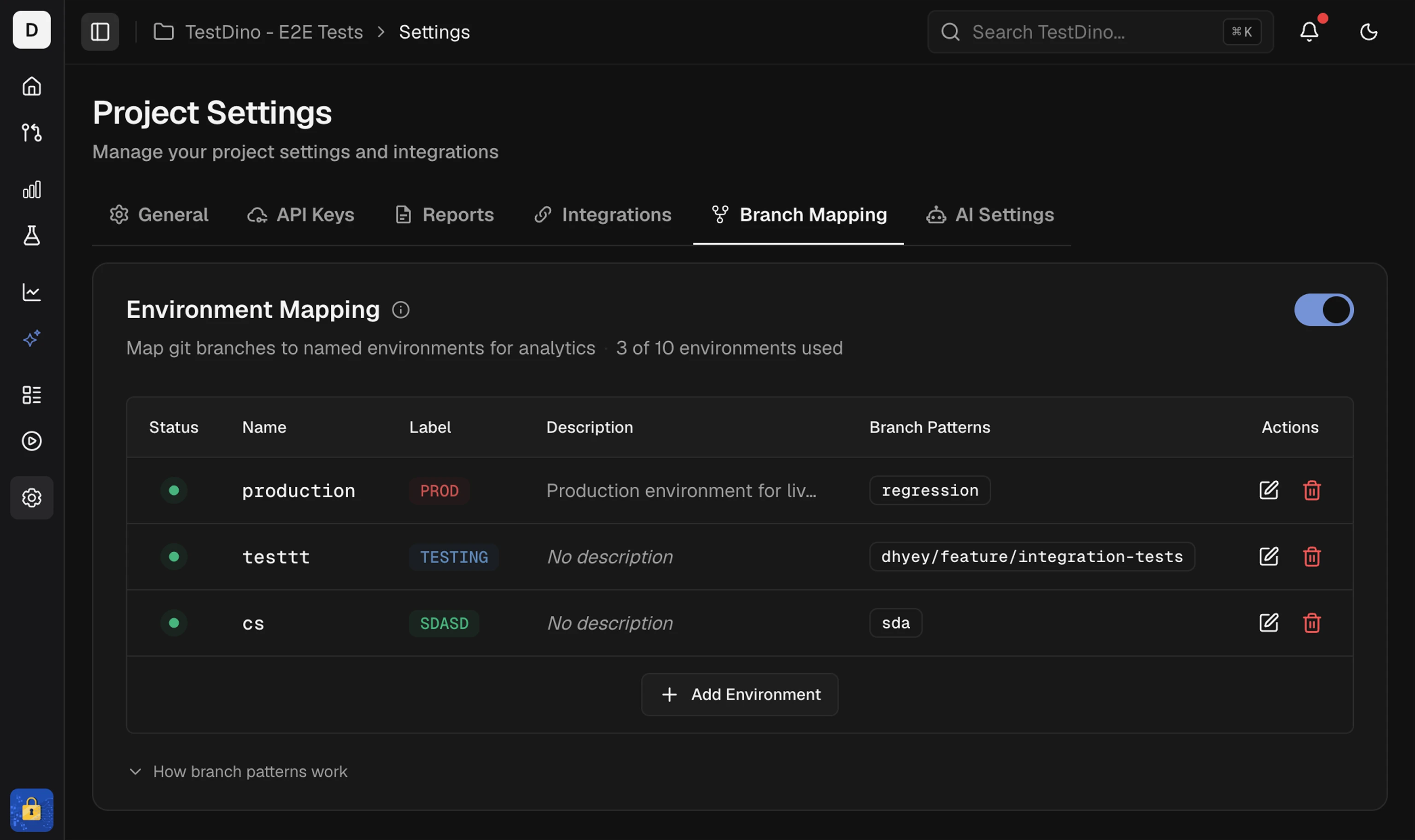 1. Enter **Name** and a short **Label**
2. Optionally set a description and color
3. Add **Branch patterns**: exact (`main`) or pattern/regex (`^feature/`)
4. Save. Changes can take up to 2 minutes to apply
A branch pattern can belong to only one environment. Duplicate patterns across environments are blocked on save. Pattern details and regex examples: [Environment Mapping](/guides/environment-mapping).
Create and store project API keys
Branch patterns and regex reference
Connect CI, Slack, and issue trackers
How AI features classify and group failures
1. Enter **Name** and a short **Label**
2. Optionally set a description and color
3. Add **Branch patterns**: exact (`main`) or pattern/regex (`^feature/`)
4. Save. Changes can take up to 2 minutes to apply
A branch pattern can belong to only one environment. Duplicate patterns across environments are blocked on save. Pattern details and regex examples: [Environment Mapping](/guides/environment-mapping).
Create and store project API keys
Branch patterns and regex reference
Connect CI, Slack, and issue trackers
How AI features classify and group failures