> ## Documentation Index
> Fetch the complete documentation index at: https://docs.testdino.com/llms.txt
> Use this file to discover all available pages before exploring further.
# Test Management
> Create manual test cases, organize suites, and run manual testing workflows in TestDino.
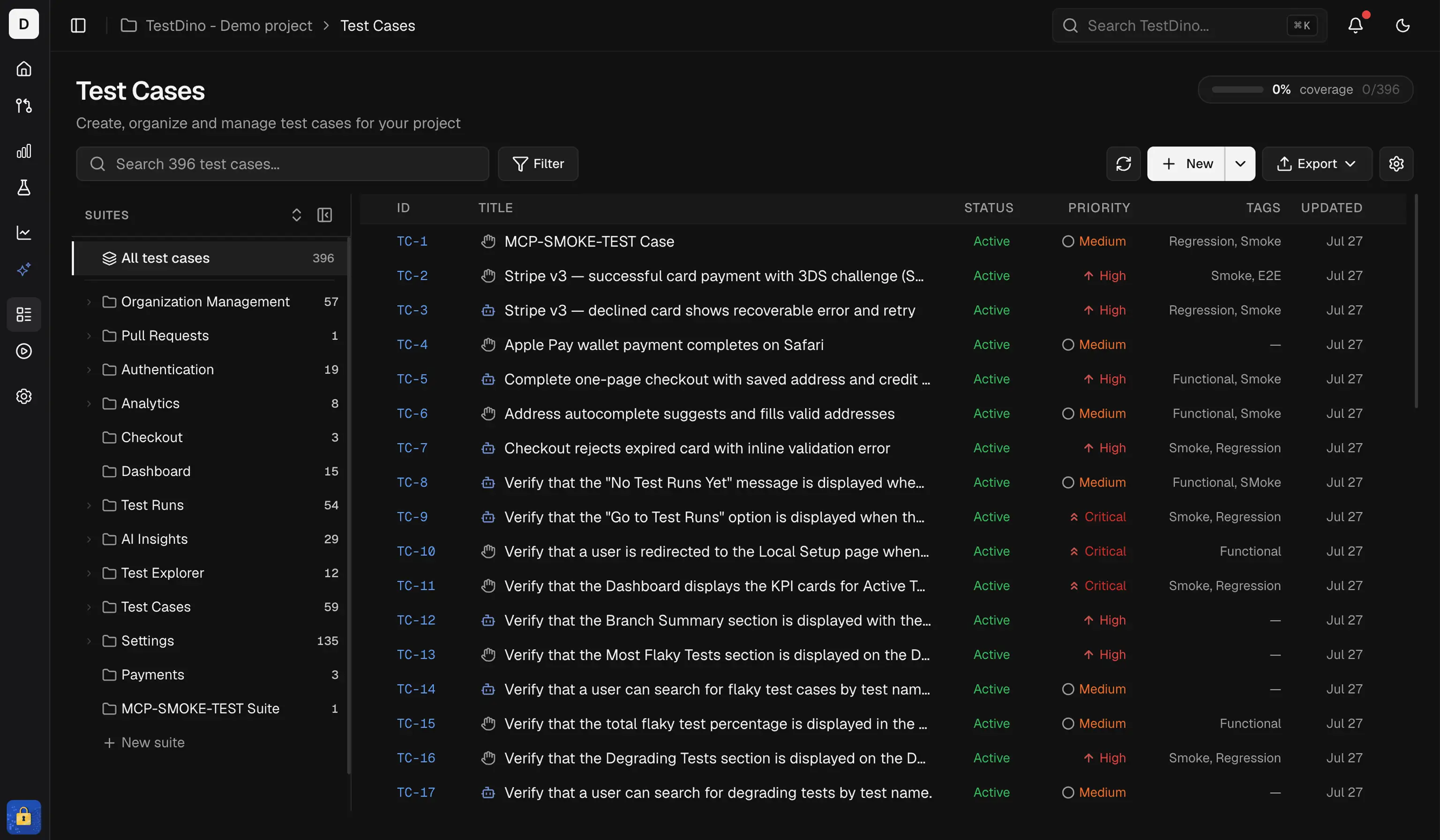
Test Management in TestDino is a workspace for building your manual test repository and running manual testing activities. It covers test case design, suite organization, planned runs, exploratory sessions, releases, and links from manual test cases to automated Playwright tests.
Test Management starts on the **Pro** plan and is not included on the Free plan. Limits scale by plan: manual test cases per project (Pro 250, Team 1,000), manual runs per month (Pro 10, Team 100), and exploratory sessions per month (Pro 5, Team 50). Enterprise is custom. See [Pricing](/pricing#test-management-limits).
 ## Capabilities
| Capability | Description |
| :----------------------------------------------------------------------- | :---------------------------------------------------------------------------------------------------------------------------------------- |
| Create & organize | Build test cases inside nested test suites. Drag-and-drop to reorder suites. |
| Classify | Tag every test case with severity, priority, type, layer, behavior, and automation status. |
| Version history | Every edit is tracked. Compare versions side-by-side and restore any previous version. |
| Bulk actions | Select multiple test cases and edit, delete, or print them in one action. |
| Search & filter | Full-text search plus filters for status, priority, and automation status. Sort by Case ID, title, or last updated. |
| Import / Export | Import CSV (TestDino, TestRail, or a custom spreadsheet) or JSON (TestDino or Testmo). Export to JSON (with optional attachments) or CSV. |
| Manual execution | Create releases, build manual runs, assign work, and track results. |
| Exploratory testing | Run exploratory sessions, capture findings, and link them to releases. |
| [Automation linking](/test-management/test-cases/list-view#linked-tests) | Link manual test cases to automated tests, or create test cases from the tests you already automated. |
| Customization | Configure enum dropdown values, create custom fields, and toggle classification fields per project. |
## Test Cases and Manual Testing
Test Management spans 2 connected areas.
| Area | What It Does | When to Use |
| :----------------- | :---------------------------------------------------------------------------- | :----------------------------------------------- |
| **Test Cases** | Create, organize, classify, import, and maintain your manual test repository | Designing and maintaining reusable test coverage |
| **Manual Testing** | Group work into releases, execute manual runs, and track exploratory sessions | Running planned or exploratory testing cycles |
## Manual Testing Views
Inside `Manual Testing`, TestDino separates execution work into 3 tabs.
| View | What It Does | When to Use |
| :--------------------------------------------------- | :---------------------------------------------------------------------------- | :---------------------------------------------------- |
| [Releases](/test-management/manual-testing/releases) | Group manual runs and sessions into releases or sub-releases | Planning work by sprint, version, cycle, or milestone |
| [Runs](/test-management/manual-testing/manual-runs) | Track a set of test cases through to a verdict, manual and automated together | Validating a release |
| [Sessions](/test-management/manual-testing/sessions) | Run exploratory testing and capture findings | Discovery, risk-based, or unscripted testing |
Suites, test cases, steps, versions, and project settings
Releases, manual runs, and exploratory sessions
Bring data in and out of Test Management
## Capabilities
| Capability | Description |
| :----------------------------------------------------------------------- | :---------------------------------------------------------------------------------------------------------------------------------------- |
| Create & organize | Build test cases inside nested test suites. Drag-and-drop to reorder suites. |
| Classify | Tag every test case with severity, priority, type, layer, behavior, and automation status. |
| Version history | Every edit is tracked. Compare versions side-by-side and restore any previous version. |
| Bulk actions | Select multiple test cases and edit, delete, or print them in one action. |
| Search & filter | Full-text search plus filters for status, priority, and automation status. Sort by Case ID, title, or last updated. |
| Import / Export | Import CSV (TestDino, TestRail, or a custom spreadsheet) or JSON (TestDino or Testmo). Export to JSON (with optional attachments) or CSV. |
| Manual execution | Create releases, build manual runs, assign work, and track results. |
| Exploratory testing | Run exploratory sessions, capture findings, and link them to releases. |
| [Automation linking](/test-management/test-cases/list-view#linked-tests) | Link manual test cases to automated tests, or create test cases from the tests you already automated. |
| Customization | Configure enum dropdown values, create custom fields, and toggle classification fields per project. |
## Test Cases and Manual Testing
Test Management spans 2 connected areas.
| Area | What It Does | When to Use |
| :----------------- | :---------------------------------------------------------------------------- | :----------------------------------------------- |
| **Test Cases** | Create, organize, classify, import, and maintain your manual test repository | Designing and maintaining reusable test coverage |
| **Manual Testing** | Group work into releases, execute manual runs, and track exploratory sessions | Running planned or exploratory testing cycles |
## Manual Testing Views
Inside `Manual Testing`, TestDino separates execution work into 3 tabs.
| View | What It Does | When to Use |
| :--------------------------------------------------- | :---------------------------------------------------------------------------- | :---------------------------------------------------- |
| [Releases](/test-management/manual-testing/releases) | Group manual runs and sessions into releases or sub-releases | Planning work by sprint, version, cycle, or milestone |
| [Runs](/test-management/manual-testing/manual-runs) | Track a set of test cases through to a verdict, manual and automated together | Validating a release |
| [Sessions](/test-management/manual-testing/sessions) | Run exploratory testing and capture findings | Discovery, risk-based, or unscripted testing |
Suites, test cases, steps, versions, and project settings
Releases, manual runs, and exploratory sessions
Bring data in and out of Test Management