Search and Filters
| Controls | Purpose | Options |
|---|---|---|
| Search | Find runs by text or ID | Commit message, run number (for example, #1493) |
| Time Period | Limit runs to a date range | Last 24 hours, 3 days, 7 days, 14 days, 30 days, Custom |
| Test Status | Filter by outcome | Passed, Failed, Skipped, Flaky |
| Duration | Sort by runtime | Low to High, High to Low |
| Author | Show runs by author | Select one or more authors |
| Environment | Focus on a mapped environment | production, development, hotfix |
| Branch | Scope by branches | Select one or more branches |
| Tags | Filter by run-level or test-case-level tags | Switch between Run Tags and Case Tags tabs, search, then select one or more tags |
Tags Filter
The Tags dropdown contains two tabs:| Tab | What it filters |
|---|---|
| Run Tags | Tags attached to the entire test run via the --tag CLI flag |
| Case Tags | Tags set on individual test cases via Playwright’s tag metadata |
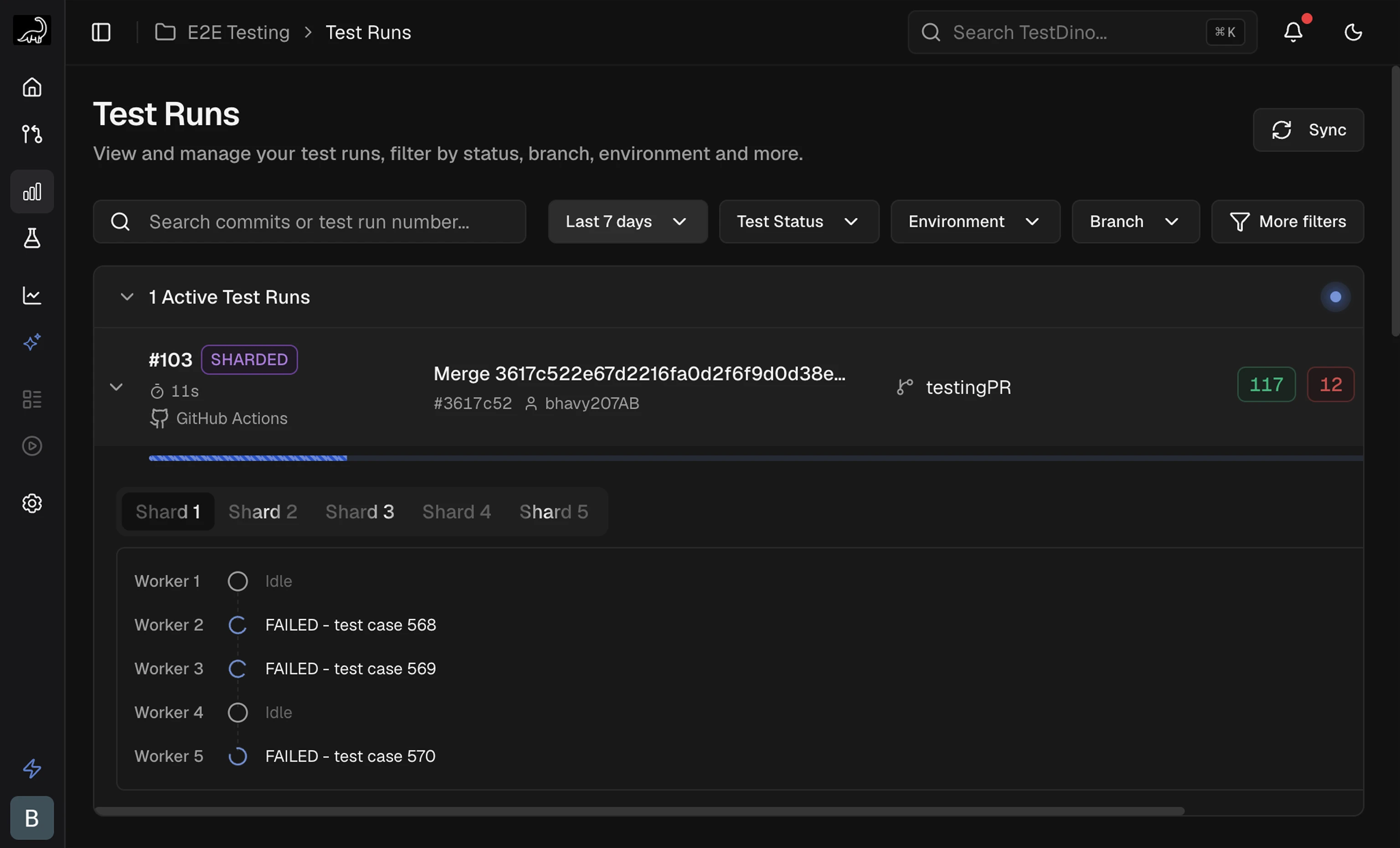
Active Test Runs
Runs currently executing appear in a collapsible Active Test Runs section at the top of the list. Results update in real time as tests complete. Each active run displays a progress bar, live pass/fail/skip counts, commit, branch, and CI source.
For sharded runs, the run is labeled SHARDED with tabs for each shard. Select a shard tab to view its workers and currently executing tests. Non-sharded runs show a single progress bar with per-worker detail.
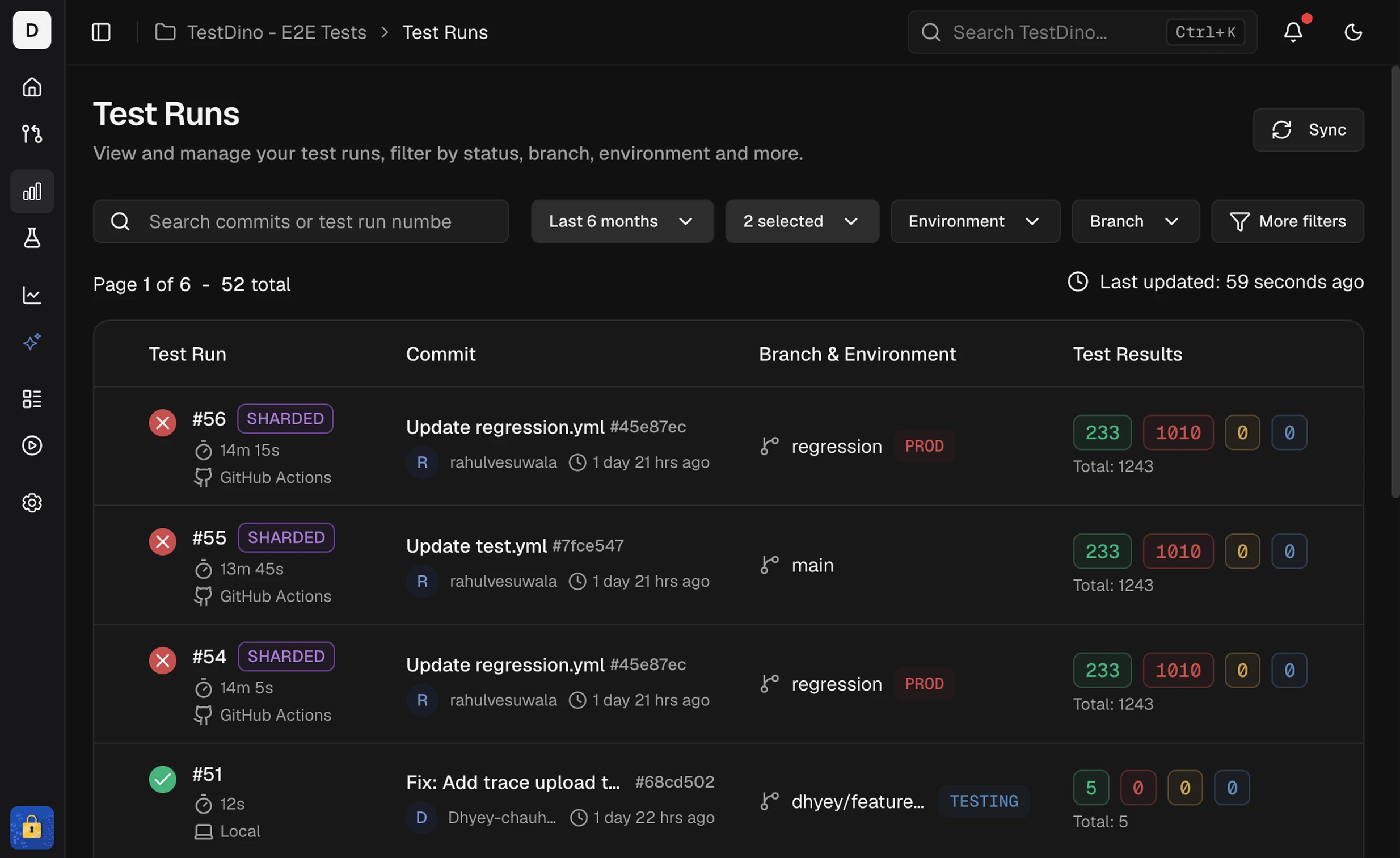
Test Run Key Columns
| Column | Description |
|---|---|
| Test Run | Run ID, start time, and executor (CI or Local). Click the CI label to open the job. |
| Commit | Commit message, short SHA, and author. Links to the commit in your Git host. |
| Branch & Environment | Branch name, mapped environment label, and run-level tag chips. When more tags exist than the row can display, a +N badge shows the remaining count. |
| Test Results | Counts for Passed, Failed, Flaky, Skipped, Interrupted and total. |
Test Run Grouping
Runs that share the same commit hash and commit message are grouped as attempts by TestDino. This usually happens when you rerun a CI workflow or trigger multiple executions for the same commit. Expand the group to see each attempt (for example, Attempt #1, Attempt #2). This grouping helps you:- Track reruns for a single commit without scanning separate rows
- Compare results across attempts to confirm if a rerun fixed flaky failures
- See how many times a workflow was triggered for the same code change
Run-Level Tags
Attach labels to an entire test run using the--tag CLI flag. Tags appear as chips on each run row in the list and are available as filter values.
| Tag type | Set via | Scope | Example |
|---|---|---|---|
| Run-level | --tag CLI flag | Entire test run | regression, sprint-42, nightly |
| Test-case-level | Test annotations | Individual test cases | smoke, critical-path, login |
Run Details Header
Opening a test run displays a header bar above the detail tabs. The header contains:| Element | Description |
|---|---|
| Commit message | The commit message and run number |
| Environment | Mapped environment badge (for example, STAGE) |
| Branch | Branch name |
| Commit SHA | Short SHA linking to the commit in your Git host |
| Author | Committer name |
| Timestamp | When the run started |
| Duration | Total run time |
| Tags | Run-level tags displayed as chips (for example, @regression, @smoke, @v1.2.3) |
--tag CLI flag. They are visible across all detail tabs (Summary, Specs, Errors, History, Configuration, Coverage).
Quick Start Steps
- Set scope - Filter by Time Period, Environment, Branch, Committer, Status, or Tags, and sort by Duration to focus the list.
- Scan and open - Review result counts, then open a run that needs action.
-
Review details - The run details page provides six tabs:
- Summary: Totals for Failed, Flaky, and Skipped with sub-causes and test case analysis
- Specs: File-centric and tag-centric views. Switch between Spec File and Tag sub-views to group by file or by tag.
- Errors: Groups failed and flaky tests by error message. Jump to stack traces.
- History: Outcome and runtime charts across recent runs. Spot spikes and regressions.
- Configuration: Source, CI, system, and test settings. Detect config drift.
- Coverage: Statement, branch, function, and line coverage with per-file breakdown.
Related
Explore runs, CI optimization, and analytics.Summary
Group failures and flakiness by cause
Detailed Analysis
Drill down to specific tests
Specs & Tags
Review results by spec file or by tag
Errors View
Group failures by error message
Historical Trends
Spot regressions and drift
Configuration Context
Debug environment differences
Coverage
Per-run code coverage breakdown
Test Case Details
Individual test analysis