| View | Groups by | Use it to |
|---|---|---|
| Spec File (default) | Spec file path | Find failing or slow files |
| Tag | Test-case tags | Assess health of tag subsets like @smoke or @regression |
Spec File View
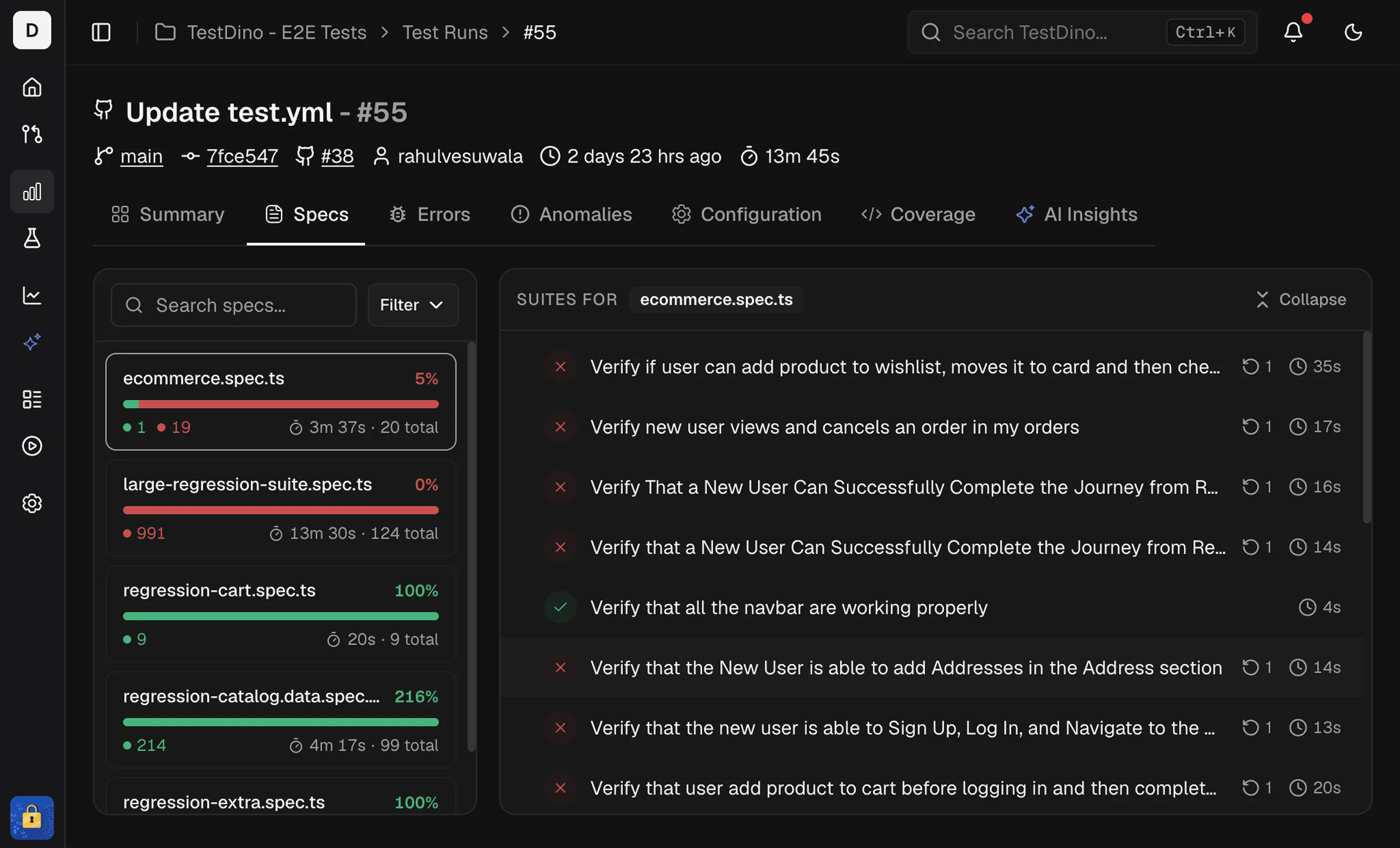
Spec List
The left panel lists every spec file in the run. Each item shows:- Spec card: File name, total tests, a status bar (pass/fail/flaky/skipped), and total duration.
- Sort: by Name, Duration, or Status to surface slow or failing files.
- Filter: show only Passed, Failed, Flaky, or Skipped specs.
- Search: type a file name to jump to a spec.
Spec Details
The right panel shows tests for the selected spec. It includes:- Suite totals at the top, including total time and test count
- A test list with status, duration, and retry or attempt badges
Sort by duration to find long-running specs first.
Tag View
Switch to the Tag view to group tests by their tags instead of by spec file. This view surfaces how each tag category performed in the run.Tag List
The left panel lists every tag found in the run. Each tag card shows:| Element | Description |
|---|---|
| Tag name | The tag label |
| Test count | Total tests with this tag in the run |
| Status bar | Color-coded bar showing pass/fail/flaky/skipped distribution |
| Status breakdown | Counts for failed, passed, and flaky tests |
Search, Sort, and Filter
| Control | Description |
|---|---|
| Search tags | Type to filter tags by name |
| Sort & Filter | Order by name, test count, or status. Filter to show only tags with specific outcomes. |
Tag Details
Click a tag card to show all tests with that tag in the right panel. Tests are grouped by spec file. Each test row displays the test name, status, and duration. Click any test to open the full detail view.Tags come from Playwright’s
tag metadata on tests or describe blocks. See the Annotations guide for how to add tags to your tests.Related
Summary, errors, and tag analytics.Summary
Group failures by cause
Errors
Group failures by error message
Tags Analytics
Track tag health trends across runs
Annotations Guide
Add tags and annotations to your tests
History
Spot regressions and drift